by pankaj | Oct 28, 2026 | Blog
Not long ago, AI was a fun chatbot you poked at when you were bored. Now it helps people write, research, code, and design. The trouble is that every job seems to want its own app, its own login, and its own monthly bill. Before long, you’re juggling more tabs than actual work.
That’s why the best all-in-one AI tools are getting so much attention in 2026. They put several AI abilities in one place, and GlobalGPT is one platform that lets you explore different AI models and tools without all the app-hopping. Here’s how this kind of tool works, and whether it’s right for you.
What Are All-in-One AI Tools?
An all-in-one AI tool brings several AI capabilities into a single platform. Instead of one app for writing, another for coding, and a third for images, you get them in one place.
People use them for content writing, research, coding, image generation, and video creation. Freelancers, marketers, and small teams tend to like them most, because fewer tabs and fewer subscriptions mean more time for real work.
How GlobalGPT Makes Everyday AI Work Easier
GlobalGPT simplifies everyday tasks by bringing different AI models and tools together in one platform, helping users handle writing, research, coding, and creative projects without constantly switching between separate services.
- Multiple AI models in one platform
Different models are good at different things. When you have multiple AI models in one platform, you can pick the one that fits your task and the quality you want, rather than forcing one tool to do everything. That flexibility is a big part of what makes the best all-in-one AI tools stand out, and it’s the idea behind GlobalGPT.
- Writing and research help
Staring at a blank page? AI writing tools can suggest ideas, summarize long articles, and draft a first version. Research tools help you sort through information faster. Just remember to fact-check everything and edit it in your own words. AI gives you a head start, not the final answer.
- Coding and technical support
AI can explain a confusing snippet, help you track down an error, and suggest possible fixes. One golden rule: test any generated code before it goes anywhere near a live project.
- Image and video creation
Creative models can help you sketch visual ideas and put together marketing content. They’re especially useful for turning “I have a vague idea” into something you can react to and refine. If you’re curious what’s on offer, take a look at the GlobalGPT website.
Key Benefits of Using an All-in-One Platform
The idea is simple: fewer moving parts. In practice, that can mean you:
- Explore multiple AI models from one place
- Spend less time switching between interfaces
- Cover writing, research, coding, and creative tasks together
- Try different models for different jobs
- Plan content more smoothly with AI productivity tools
- Find tools that match your own or your business’s needs
All-in-One Platform vs. Separate AI Tools
So is one platform really better than a handful of separate apps? Honestly, it depends on how you work. A unified platform is convenient. You get one place, fewer interfaces, and less clutter. With separate tools, you end up managing multiple subscriptions, model access and usage limits.
Dedicated tools still have their place, though. They can win for specialized jobs where you need real depth. All-in-one platforms shine for variety, while specialists shine for precision. Before you commit to any option, including GlobalGPT, compare current features and pricing. Whichever route you take, good AI productivity tools should save you time, not add admin.
Who Can Benefit From GlobalGPT?
You don’t need to be a tech expert to get something out of the best all-in-one AI tools. Here’s who may benefit most:
- Content writers: brainstorm topics and draft first versions with AI writing tools
- Digital marketers: come up with campaign ideas using AI content creation tools
- Students and researchers: summarize and organize information with AI research tools
- Developers: get code explanations and debugging suggestions
- Designers and creators: experiment with AI-generated images and videos
- Small businesses: use AI tools for business to speed up everyday tasks
How to Get Started With GlobalGPT
Start by deciding what you want to do, then match it to a model or tool.
- Visit the GlobalGPT website.
- Browse the available AI models and tools.
- Choose the one that suits your task.
- Write a clear, detailed prompt.
- Review the result and refine your prompt if needed.
- Check the plans, features, and usage limits before you commit.
Is GlobalGPT Worth Exploring in 2026?
If you’re tired of switching between apps, it’s probably worth a look. The best all-in-one AI tools make it easy to try different AI capabilities in one spot. How useful any of them is, though, depends on the models available, the features you need, and what you plan to do with them.
My advice is to test it on one real project, like a blog draft, a research summary, or a creative idea. If it makes your day easier, great. Ready to try it? Explore GlobalGPT and see for yourself.
Frequently Asked Questions
- What are the best all-in-one AI tools in 2026?
The best all-in-one AI tools combine writing, research, coding, and creative features in one platform. GlobalGPT is one option to explore, and it’s worth comparing a few before you choose.
- What is GlobalGPT and how does it work?
It’s a platform for exploring different AI models and tools. You pick a tool that fits your task, enter a prompt, and review the result.
- Can GlobalGPT provide access to multiple AI models?
That’s the idea behind it: multiple AI models in one platform. Check the website for the models currently available.
- Can GlobalGPT help with writing and research?
Yes, you can use it to brainstorm, summarize information, and draft content. Always fact-check and edit the results yourself.
- Does GlobalGPT support AI image and video generation?
Creative models can help with visual concepts and video content. Visit the official site to see which image and video tools are currently offered.

by pankaj | Oct 28, 2026 | Blog
If you’ve ever lost half a morning to the same copy-and-paste chores, you already know why AI is moving into everyday business. The big shift isn’t chatbots that answer questions. It’s agents that do the work while you get on with your day. So CREAO AI is the idea of a platform to build and run agents for your repetitive workflows. It connects to your tools, runs on a schedule, and remembers the way you like things done. Let’s break down how it works.
What Is CREAO AI?
It’s a platform for AI business automation without the coding. You describe a task in plain language, and you set up an agent to handle it. So how is that different from a regular chatbot? A chatbot waits for your question, answers once, and moves on. An agent can run on its own, repeat a task every day or week, and work inside your connected apps.
It’s the difference between asking someone for advice and handing them a job. It suits marketers, agencies, freelancers, sales teams, and small businesses- basically anyone buried in tasks that keep coming back around.
Key Features of CREAO AI
Here are the CREAO AI features that matter most for day-to-day work. You can see the full list on the official features page.
You can create custom agents for specific jobs, like writing SEO briefs, replying to quote requests, or putting together reports. CREAO AI agents are built around your tasks, not the other way around.
- Workflow Automation and Scheduled Tasks
Agents can run daily, weekly, or whenever something specific happens. That kind of AI workflow automation takes a lot of manual repetition off your plate.
- Integrations With Business Tools
It connects with Gmail, Slack, Google Sheets, Notion, and Google Calendar. Agents can work inside the processes you already have instead of forcing you into new ones.
- Memory and Personalized Workflows
It can hold on to your preferences, past decisions, and working instructions. That means less repeating yourself and more consistent results from one task to the next.
- AI Content and Media Generation
Beyond text, it covers video generation, image creation, voice and speech, and even browser use.
How to Use CREAO AI for Business Automation
Using CREAO AI for business automation can help individuals and teams work more efficiently by simplifying repetitive tasks, connecting business tools, and freeing up time for more important work.
- Head to the CREAO website and create an account.
- Describe the task you want to automate.
- Configure the agent and connect the tools it needs.
- Set a schedule or trigger for recurring tasks.
- Review the results and adjust the approval settings as needed.
Benefits of Using CREAO AI
Using CREAO AI for business automation can help individuals and teams work more efficiently by simplifying repetitive tasks, connecting business tools, and freeing up time for more important work.
- It saves time on repetitive tasks.
- It keeps automated business workflows consistent.
- You don’t have to repeat instructions for recurring work.
- It automates across the apps you’ve connected.
- Approval controls let you keep a human in the loop for important actions.
- Individuals and small teams can handle more work in the same hours.
CREAO AI Pricing and Plans
There’s a free plan plus paid options. Credits, team size, scheduling, and upload limits can differ between plans, so compare current features and pricing before you choose one. The CREAO AI always has the latest details. With any of the AI productivity tools out there, the best plan is the one that fits your real workload.
Who Should Use CREAO AI?
- Digital marketers and SEO pros: automate a weekly keyword report.
- Agencies and freelancers: draft a client update every Friday.
- Small business owners: reply to quote requests faster.
- Sales and recruitment teams: send follow-ups and log them in Google Sheets.
- E-commerce and operations managers: summarize daily orders and flag problems in Slack.
Is CREAO AI Worth Trying in 2026?
Probably, if you’ve got repetitive work piling up. Its strengths are agents, integrations, scheduling, and memory. But the value depends on what you automate, which tools you need connected, and the usage limits on your plan.
My advice is to start small. Pick one repeatable task and turn it into one of your automated business workflows. If it saves you time, build from there. That’s the easiest way to test AI business automation without overcommitting. Ready to see CREAO AI in action?
FAQs
- What is CREAO AI used for?
It’s used to build and run agents for recurring work. CREAO AI agents can handle things like reports, replies, and scheduled tasks.
- Is it suitable for beginners?
Yes. You describe the task in plain language, so you don’t need technical skills.
- Can it automate repetitive business tasks?
Yes, and that’s the heart of its AI workflow automation.
- Does it offer a free plan?
It does, so you can test it before upgrading.
- What tools can it connect with?
Gmail, Slack, Google Sheets, Notion, and Google Calendar. Check the CREAO AI features page for the current list.

by pankaj | Oct 27, 2026 | Blog
Your domain name is your address on the internet. Whether you’re launching a business, starting a personal blog, or building a side project, it’s often the first thing people see and the thing they’ll remember. Getting it right matters more than most people think.
That’s where Name.com comes in. Name.com is a platform for registering domains and picking up other website essentials in one place, including hosting, professional email, and website-building options. If you’re wondering whether it’s the right fit, this review walks through what it offers and how to get started.
What Is Name.com?
Name.com is an ICANN-accredited domain registrar, which simply means it’s officially authorised to sell and manage domain names. It helps individuals, entrepreneurs and businesses set up an online presence without juggling a bunch of different providers.
Beyond registration, you’ll find domain transfers, renewals, hosting and email solutions under one roof. Think of it as a one-stop shop for getting online. You can see the full lineup on the Name.com official website, which is the best place to check current details before you decide anything.
Key Features and Services Offered by Name.com
- Domain Name Registration
Search for the name you want and see right away whether it’s available. You can pick from popular extensions like .com, .net, and .org, as well as newer ones that might suit your niche. A memorable domain makes your brand easier to find, easier to share, and harder to forget, so it’s worth taking a little time here.
- Website Hosting and Website Builder
There are hosting options for different kinds of sites, and the available solutions vary depending on the plan you choose. If coding isn’t your thing, the website builder lets beginners put a site together without advanced technical skills. That makes it a gentle starting point for first-timers.
- Professional Business Email
An address like hello@yourbusiness.com looks far more trustworthy than a free webmail account. Name.com offers email solutions, including Titan Email and Google Workspace where offered, which can make talking to customers feel more polished. It’s a small touch that builds trust quickly.
- Domain Security and Privacy
Features like domain privacy, domain locking, and SSL certificates help protect both your ownership and your visitors’ connections. That matters, because losing control of a domain or running an unsecured site can hurt your reputation fast. These services are presented on the official website and support pages.
Why Choose Name.com for Your Online Business?
- Everything in one place- domains, hosting, and email, all under one login.
- Lots of extensions- find one that suits your brand.
- Security built in- privacy and domain protection come with eligible registrations.
- Help when you need it- support resources are there if you get stuck.
- Your choice- Pick only what your site and budget need.
Want a look? Pop over to Name.com and browse at your own pace.
How to Register a Domain Name with Name.com
Here are the steps to register your domain name
- Go to the Name.com website.
- Type in the domain you want.
- See if it’s free, and check other extensions too.
- Compare the price and renewal terms.
- Add it to your cart and check out.
- Set up your domain settings, and you’re done.
Quick heads-up: availability, pricing, and conditions can vary, so read the details before you pay.
Tips for Choosing the Right Domain Name
Here are the best steps to choose the right name for your domain
- Keep it short and easy to remember.
- Make sure it fits your business or topic.
- Skip tricky spellings and extra hyphens.
- Pick an extension that suits your site.
- Check social media handles and trademark clashes.
- Look at the renewal price, not just the first-year deal.
Final words
If you like having domains, hosting, email, and security in one place, Name.com is worth a look. It can work well for small businesses, bloggers, developers, and entrepreneurs. Just compare features, pricing, and renewal terms first, so there are no surprises later.
FAQs
- What is Name.com used for?
It’s used for registering domain names, and it also offers website hosting, email, and related services.
- Can I register a domain through Name.com?
Yes. You can search for available domains and register eligible names.
- Does Name.com offer website hosting?
Yes, it has hosting solutions for different website needs, and what’s available depends on the plan you pick.
- Can I create a professional email address with Name.com?
Yes. Domain-based email options are available, including Titan Email and Google Workspace where offered.
- Does Name.com provide domain privacy protection?
Privacy and security features depend on domain eligibility and the applicable service terms, so check the details at checkout.
by pankaj | Oct 27, 2026 | Blog
Look around for a second. There’s a good chance something nearby has a Samsung logo on it: the phone in your hand, the TV in the next room, maybe the fridge humming in the kitchen. Samsung makes a lot of the everyday tech we stop noticing, and it designs much of it to work together. Curious what’s new this year? The Samsung official website is a good place to start, and this guide will help you figure out where to look first.
A Quick Tour of Samsung’s Product Range
The lineup is big, so let’s take it one category at a time.
- Samsung Galaxy Smartphones
Galaxy phones come at a range of price points, so you’re not pushed toward a flagship you don’t need. Across the range, you’ll find good cameras, sharp displays, and solid performance, plus Galaxy AI features on supported models.
My advice is to choose based on how you actually use your phone. Maybe you take a lot of photos, play games, or just need something that gets through a long workday. A longer spec sheet doesn’t always mean a better phone for you, and putting a few Samsung Galaxy smartphones side by side usually makes the choice obvious.
- Tablets, Watches and Earbuds
Galaxy tablets are handy for watching shows, studying, or getting work done on the move. Add a Galaxy Watch and Galaxy Buds, and you have a small family of devices that play nicely together. When compatible products connect, the little things get easier, like picking up where you left off or controlling things right from your wrist.
- Samsung TVs and Home Entertainment
Samsung’s TVs and monitors cover a mix of display technologies and smart features. The best one depends on your space. A huge screen in a tiny room is overwhelming, and a small one in a big living room looks lost. Before you buy, think about your room size and how you watch, whether that’s movie nights, sports or gaming.
- Samsung Home Appliances
Refrigerators, washing machines, air conditioners, and more all sit in this category. Many models focus on energy efficiency, smart connectivity and AI-powered features where available. Smart appliances can link up through an app, so you can check on a cycle without standing next to the machine. Want a look at what’s on offer? Browse the home appliance collection.
What Makes Samsung Stand Out?
A few things tend to set the brand apart:
- A broad portfolio: phones, TVs, wearables and appliances from one brand.
- Modern design: plenty of models for different tastes and budgets.
- Real upgrades: display, camera, and performance improvements across selected products.
- AI-powered features: available on supported devices.
- Connected experiences: compatible Galaxy products and SmartThings can work together.
- Support options: product help and after-sales service when you need it.
How Samsung Fits Into Everyday Life
Tech matters most when it makes your day easier. A Galaxy phone can handle a quick text or a full work session. In the evening, a Samsung TV and compatible audio gear can turn the living room into your own little cinema.
Around the house, smart appliances can take some of the hassle out of laundry, cooling, and food storage. And you don’t have to buy everything at once. Start with one device and build a connected setup at your own pace.
Why Shop on Samsung’s Official Online Store?
Purchasing directly from the supplier has advantages. On the official website, you can:
- View the complete online catalog.
- Compare available models, features, and specifications.
- Examine available deals, qualifying promotions, and available payment methods.
- Examine delivery details, warranty information, and service assistance.
Before making a decision, it’s simple to view everything in one location with information you can rely on to be up to date.
Final Thoughts
Samsung offers plenty of variety, steady innovation,n and an ecosystem that grows with you. Whether you’re eyeing a new Galaxy phone, a TV upgrade or smarter appliances, the best choice comes from matching the product to your own priorities, not just the flashiest feature. Ready to find your match? Head to the Samsung official website for product details and current offers.
FAQs
- What products does Samsung offer?
Samsung makes smartphones, tablets, wearables, TVs, monitors, and home appliances.
- Why do people choose Samsung?
Many like the wide range, modern design, and the way devices connect.
- Which Samsung products support Galaxy AI?
Galaxy AI features are available on supported devices, so check the details for the specific model you’re considering.
- Can I buy smartphones and home appliances online from Samsung?
Yes, you can browse both on the official online store.
- How do I check Samsung’s latest offers?
Visit the official website to see current offers, eligible promotions, and payment options.
by pankaj | Oct 26, 2026 | Blog
Choosing a host is a bit like choosing a business partner. Get it right and everything just works. Get it wrong, and you’re stuck with slow pages, clunky dashboards, and surprise bills. So let’s take an honest look at what Kamatera offers this year. In this Kamatera review 2026, we’ll walk through the features, the pricing approach, and who it actually suits, so you can decide without wading through marketing fluff.
What Is Kamatera? An Introduction to the Brand
Kamatera is a cloud infrastructure and hosting provider that lets you build servers the way you want them, instead of squeezing you into a fixed package. Kamatera cloud hosting is built for a wide mix of people: startups testing a new idea, developers who need a flexible playground, small businesses running websites, and larger enterprises handling heavy workloads.
What makes the brand interesting is its build-it-yourself philosophy. Rather than picking “Plan A” or “Plan B,” you decide how much power you need and pay for that. If you want to see the full platform for yourself, head over to the official Kamatera website.
What Cloud Hosting Services Does Kamatera Offer?
Kamatera hosting services cover a lot more than a single product. Here’s a quick tour of the main ones.
Kamatera Cloud Servers
Kamatera cloud servers are fully customizable. You choose the CPU, RAM, and storage, then use that server for websites, apps, or databases. A simple blog doesn’t need the same setup as a busy online store, and that’s exactly the point. You shape the server around your workload, not the other way around. This is where Kamatera cloud hosting really shows how adaptable it is, especially if your projects vary in size and demand.
Kamatera VPS Hosting
If you want more control, Kamatera VPS hosting gives you a virtual private server with configurable resources. You pick the operating system, set things up your way, and keep full control of your environment. It’s a nice middle ground between basic shared hosting, where you share resources with strangers, and a full dedicated machine, which can be overkill and expensive.
Additional Cloud Solutions
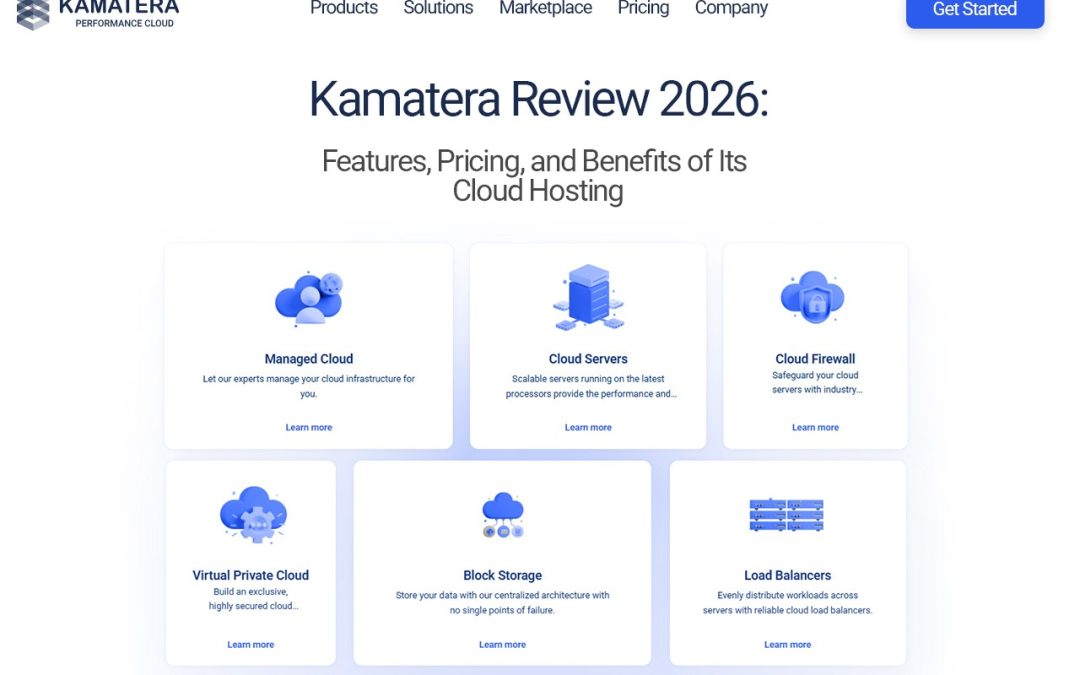
Beyond the basics, there are extras worth knowing about: cloud firewalls, load balancers, block storage, and private networking. Managed cloud services are available too, in case you’d rather hand off some of the day-to-day work. These add-on Kamatera hosting services let your setup grow without forcing you to switch providers or rebuild from scratch.
Key Features and Benefits of Kamatera
Here’s what stands out:
- Flexible server configurations: build exactly what your project needs.
- Scalable resources: adjust up or down as your traffic or business changes.
- Global data center locations: place servers closer to your visitors for faster load times.
- 24/7 technical support: help is there when something breaks at 2 a.m.
- Uptime guarantee and reliable infrastructure: your site stays available, and you can check the exact terms on the official site.
The real benefit of Kamatera cloud hosting comes down to control. You’re not paying for resources you’ll never touch, and you’re not stuck when you outgrow your plan. For a growing business, that kind of room to breathe matters more than a flashy feature list.
Kamatera Pricing: What Should You Know?
Kamatera pricing is built around the resources you choose, which is refreshing if you’ve ever felt boxed in by rigid tiers. You can typically pay hourly or monthly, depending on how you work. Short-term testing? Hourly makes sense, since you only pay while the server runs. Running a live site long term? Monthly is usually the simpler route.
What shapes your bill? Mainly CPU, RAM, storage, and any extra services like backups or load balancers. The more you add, the higher the cost, so it pays to be deliberate about what you really need.
A simple way to choose a setup: start with your workload and your budget. Estimate your traffic, pick a modest configuration, and watch how your server performs for a few weeks. Then scale up only when the numbers tell you to. Kamatera cloud hosting rewards that step-by-step approach. For the latest figures, always check the official website, since rates can change.
Who Should Consider Kamatera Cloud Hosting?
Kamatera cloud hosting can work well for several types of users:
- Small businesses hosting a company website without wanting to overpay.
- Developers building and testing applications in flexible environments they can spin up and tear down quickly.
- E-commerce stores that need to handle traffic spikes during sales and festive seasons.
- SaaS companies and growing businesses that need infrastructure to scale alongside their customer base.
If your needs change often, flexibility like this is a big advantage. If your needs never change, you may be fine with something simpler.
Pros and Considerations of Using Kamatera
No provider is perfect, so let’s keep this balanced.
Potential advantages
- Flexible server configurations
- Scalable infrastructure
- Multiple hosting options
- Global infrastructure and round-the-clock support
Things to consider
- Total cost depends on the configuration you select.
- Unmanaged servers may require some technical knowledge.
- Additional services can increase your overall bill.
Kamatera cloud hosting’s greatest advantage is freedom, but freedom is accompanied by responsibility. If you are not comfortable managing a server, look at the managed ones or budget some time to learn the basics. A little preparation goes a long way.
How to Get Started With Kamatera
Getting started with Kamatera cloud hosting takes just a few steps:
- Visit the official Kamatera website.
- Choose a cloud server or VPS solution.
- Configure the resources you need.
- Review the pricing and service options.
- Deploy your server and start managing it.
Take your time on step three. Getting the configuration roughly right at the start saves you from awkward changes later.
Final Verdict: Is Kamatera Worth Considering in 2026?
Kamatera combines flexible configurations, scalable resources, global data centres, and 24/7 support in one platform. Kamatera cloud hosting is great for businesses and developers who want control over their setup and a billing model that matches how they actually work. If you want the experience to be completely hands-off, with no technical involvement, it’s not ideal.
The best approach is to compare your needs with the plans available. Consider your traffic. Consider your budget. Consider your comfort level with server management. If those line up, you’ve likely found a solid match. Ready to see if it fits? Explore Kamatera cloud hosting on the official Kamatera website and build a server that matches your project.
FAQs
- What hosting services does Kamatera offer?
Kamatera offers customizable cloud servers, VPS hosting, cloud firewalls, load balancers, block storage, and managed cloud services.
- Is Kamatera suitable for small businesses?
Yes. Small businesses can use Kamatera to host websites, applications, and online stores, with server configurations tailored to their requirements and budgets.
- How much does Kamatera cloud hosting cost?
Kamatera pricing depends on the selected server resources, configuration, and additional services. It offers hourly and monthly billing options, so check its official website for current prices.
- Does Kamatera offer VPS hosting?
Yes. Kamatera provides VPS hosting with configurable server resources and operating system options for different workloads.
- Can I scale server resources with Kamatera?
Yes. Kamatera allows users to adjust cloud server resources to accommodate changing workloads and business requirements, subject to the available configuration options.