Not long ago, AI was a fun chatbot you poked at when you were bored. Now it helps people write, research, code, and design. The trouble is that every job seems to want its own app, its own login, and its own monthly bill. Before long, you’re juggling more tabs than actual work.
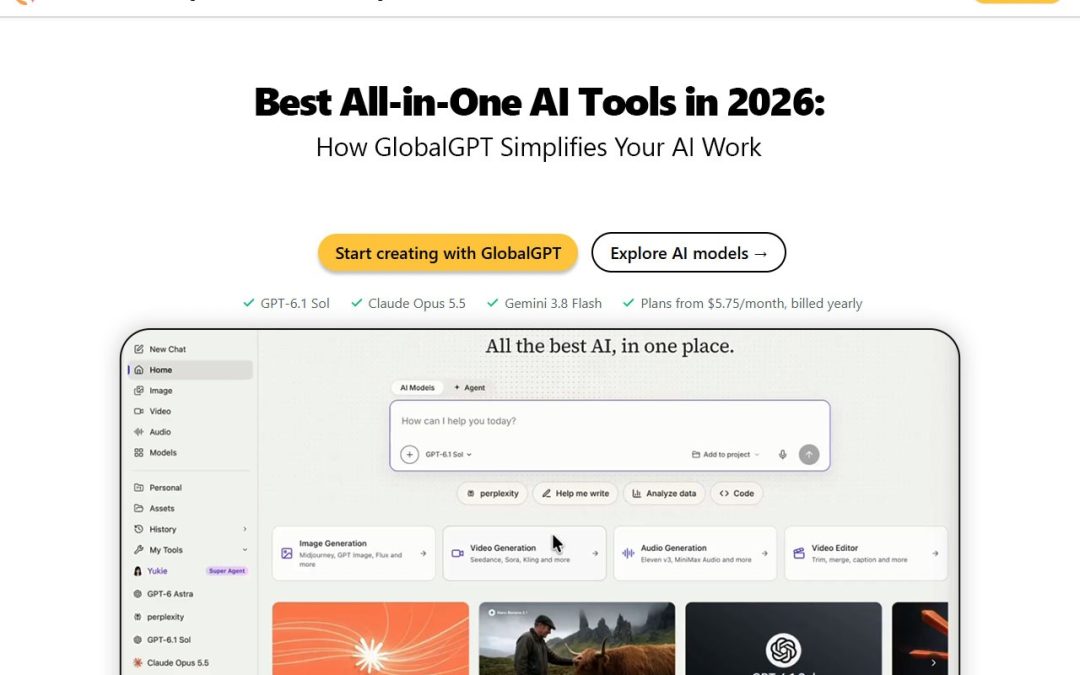
That’s why the best all-in-one AI tools are getting so much attention in 2026. They put several AI abilities in one place, and GlobalGPT is one platform that lets you explore different AI models and tools without all the app-hopping. Here’s how this kind of tool works, and whether it’s right for you.
What Are All-in-One AI Tools?
An all-in-one AI tool brings several AI capabilities into a single platform. Instead of one app for writing, another for coding, and a third for images, you get them in one place.
People use them for content writing, research, coding, image generation, and video creation. Freelancers, marketers, and small teams tend to like them most, because fewer tabs and fewer subscriptions mean more time for real work.
How GlobalGPT Makes Everyday AI Work Easier
GlobalGPT simplifies everyday tasks by bringing different AI models and tools together in one platform, helping users handle writing, research, coding, and creative projects without constantly switching between separate services.
- Multiple AI models in one platform
Different models are good at different things. When you have multiple AI models in one platform, you can pick the one that fits your task and the quality you want, rather than forcing one tool to do everything. That flexibility is a big part of what makes the best all-in-one AI tools stand out, and it’s the idea behind GlobalGPT.
- Writing and research help
Staring at a blank page? AI writing tools can suggest ideas, summarize long articles, and draft a first version. Research tools help you sort through information faster. Just remember to fact-check everything and edit it in your own words. AI gives you a head start, not the final answer.
- Coding and technical support
AI can explain a confusing snippet, help you track down an error, and suggest possible fixes. One golden rule: test any generated code before it goes anywhere near a live project.
- Image and video creation
Creative models can help you sketch visual ideas and put together marketing content. They’re especially useful for turning “I have a vague idea” into something you can react to and refine. If you’re curious what’s on offer, take a look at the GlobalGPT website.
Key Benefits of Using an All-in-One Platform
The idea is simple: fewer moving parts. In practice, that can mean you:
- Explore multiple AI models from one place
- Spend less time switching between interfaces
- Cover writing, research, coding, and creative tasks together
- Try different models for different jobs
- Plan content more smoothly with AI productivity tools
- Find tools that match your own or your business’s needs
All-in-One Platform vs. Separate AI Tools
So is one platform really better than a handful of separate apps? Honestly, it depends on how you work. A unified platform is convenient. You get one place, fewer interfaces, and less clutter. With separate tools, you end up managing multiple subscriptions, model access and usage limits.
Dedicated tools still have their place, though. They can win for specialized jobs where you need real depth. All-in-one platforms shine for variety, while specialists shine for precision. Before you commit to any option, including GlobalGPT, compare current features and pricing. Whichever route you take, good AI productivity tools should save you time, not add admin.
Who Can Benefit From GlobalGPT?
You don’t need to be a tech expert to get something out of the best all-in-one AI tools. Here’s who may benefit most:
- Content writers: brainstorm topics and draft first versions with AI writing tools
- Digital marketers: come up with campaign ideas using AI content creation tools
- Students and researchers: summarize and organize information with AI research tools
- Developers: get code explanations and debugging suggestions
- Designers and creators: experiment with AI-generated images and videos
- Small businesses: use AI tools for business to speed up everyday tasks
How to Get Started With GlobalGPT
Start by deciding what you want to do, then match it to a model or tool.
- Visit the GlobalGPT website.
- Browse the available AI models and tools.
- Choose the one that suits your task.
- Write a clear, detailed prompt.
- Review the result and refine your prompt if needed.
- Check the plans, features, and usage limits before you commit.
Is GlobalGPT Worth Exploring in 2026?
If you’re tired of switching between apps, it’s probably worth a look. The best all-in-one AI tools make it easy to try different AI capabilities in one spot. How useful any of them is, though, depends on the models available, the features you need, and what you plan to do with them.
My advice is to test it on one real project, like a blog draft, a research summary, or a creative idea. If it makes your day easier, great. Ready to try it? Explore GlobalGPT and see for yourself.
Frequently Asked Questions
- What are the best all-in-one AI tools in 2026?
The best all-in-one AI tools combine writing, research, coding, and creative features in one platform. GlobalGPT is one option to explore, and it’s worth comparing a few before you choose.
- What is GlobalGPT and how does it work?
It’s a platform for exploring different AI models and tools. You pick a tool that fits your task, enter a prompt, and review the result.
- Can GlobalGPT provide access to multiple AI models?
That’s the idea behind it: multiple AI models in one platform. Check the website for the models currently available.
- Can GlobalGPT help with writing and research?
Yes, you can use it to brainstorm, summarize information, and draft content. Always fact-check and edit the results yourself.
- Does GlobalGPT support AI image and video generation?
Creative models can help with visual concepts and video content. Visit the official site to see which image and video tools are currently offered.